Wednesday, August 1, 2007

Task 3: Grab yourself a blog in 3 steps

Listen to this podcast [2:17]-->powered by ODEO

(All relevant information is below as this podcast may be blocked by the TAFE network)

Now that you’ve done some exploring around this website and understand how this program will work, it’s time to setup your very own personal blog to begin recording your thoughts, discoveries and exercises in. For this program, I recommend that you use
Blogger*, a popular free online blog hosting service that is extremely easy to use.

Creating a blog using
Blogger takes just three steps:

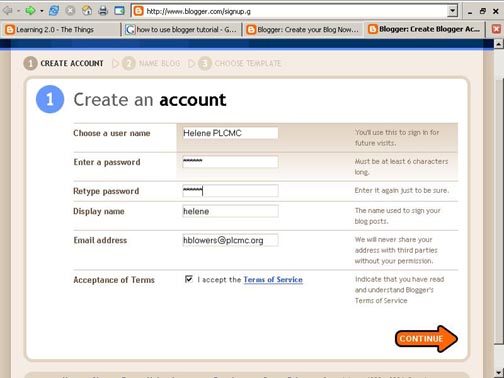
  1. Create an account (view screenshot)
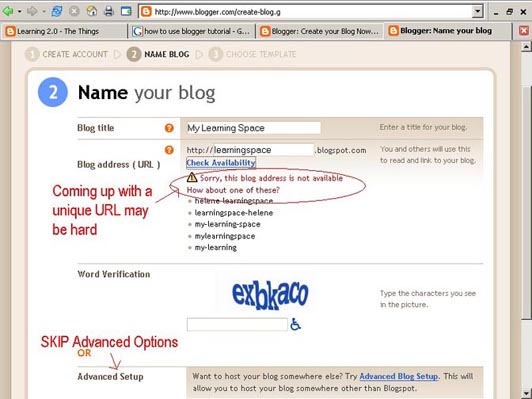
  2. Name your blog (view screenshot)
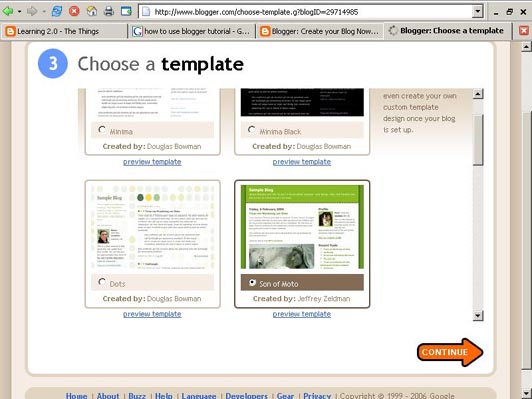
  3. Select your template. (view screenshot)

Once you’ve created your blog here are two important things to know:

  • To add posts: The maintenance interface that you will use to add posts, edit or change the step-up your blog is accessed online at http://www.blogger.com/. Be sure to write down your login and password.
  • To view your blog: Your blog address is http://xxxx.blogspot.com/, where xxxx = the unique identifier you entered in Step 2. Be sure to also write down your blog address.

If you run into problems or would like more information about blogs and using Blogger here are some discovery resources you can use:

OK -- Now, it’s your turn...

Discovery Exercise:

  1. Setup a blog for yourself through Blogger. Be sure to write down your login and password. Be sure to also write down your blog address.
  2. Add a test post or two. Note: Use one of your test posts to create an entry about the habits among the 7 and 1/2 lifelong learning habits that is easiest and hardest for you & why.
  3. Have fun!!!!

IMPORTANT NOTE: How you choose to identify yourself on your blog is your choice. You can blog under a screen name, anonymously, or as yourself. However, in order to qualify for the staff incentives and prize drawings, you will need to have registered on "tql learning 2.0" using your full name and institute, and mark off your progress through the Tracking log.

* Use of Blogger is only a recommendation. If there is another blog hosting site that you are more comfortable with, please feel free to use it.

When you are ready, continue to the next weekly task.

Task 2: Lifelong Learning & Learning 2 .0

Listen to this podcast [1:31]-->

(All relevant information is below as this podcast may be blocked by the TAFE network)

Among libraries, lifelong learning is one of those core values we shelve our books by. So it makes sense that before we embark on this new online learning and discovery journey that we should take a few minutes to review a few habits that can assist in creating lifelong learners.

These habits, which we’ve called the Seven and 1/2 Habits of Highly Successful Lifelong Learners, will provide you with a refresher on what it means to be a lifelong learner.

Discovery Exercise:

  1. Make sure you have headphones or speakers attached to your computer.
  2. Open up the 7 & 1/2 Habits online tutorial [14:18] and view the online: tutorial. Please have pen and paper ready. (Note: If you find it a bit slow, you can read the text and then skip ahead to the next slide. Also, please do not click on the feedback link on the last page. To provide feedback, please add comments to this post.)
  3. As you watch and listen, write down which habit among the 7 & 1/2 is the easiest for you and which is the hardest. You will use your personal blog (which you will set up next) to post your thoughts about lifelong learning.

Have fun! If you haven't jumped on board yet, it's never too late to become a lifelong learner.

Next Up: Creating your blog so you can begin tracking your journey. Several staff have already taken a jump start on this activity, so if you're up to it why not join the early bird crowd.

Task 1: Discovery has never been so much fun ...

Listen to this podcast [1:53]-->powered by ODEO
(Obviously when they say "PLCMC" please think "TAFE QLD libraries"!) :-)

(All relevant information is below as this podcast may be blocked by the TAFE network)

Welcome to the "tql learning 2.0" program & blog. Chances are if you've found your way here you're either:


  • a member of TAFE Queensland Libraries staff who's participating in the Learning 2.0 challenge;
  • interested in learning about and playing around (yes, playing is allowed in libraries) with some new Web 2.0 tools that will help you expand your information literacy toolbox.
Either way… I'm glad you're here!!

Learning 2.0 is an online learning program that encourages staff to learn more about emerging web technologies that are changing the way people, society and libraries access information and communicate with each other.

Over the course of the next nine or ten weeks, this website will highlight “23 Things” and discovery exercises to help staff become familiar with blogging, RSS news feeds, tagging, wikis, podcasting, online applications, and video and image hosting sites.

To familiarize yourself with this project, be sure to read the
About page. The FAQs should answer most of your questions about this program. If not, then please add your question to the FAQ page as a comment, or add a comment to this blog.

So fasten your seat belts, grab your mouse and get ready for a discovery adventure… and remember, it's OK to play in the library and have fun!

Feel free to work ahead if you feel capable, but if you're that good I may call on you to help others in your area! ;-)

When you are ready, continue to the next weekly task.


tql learning 2.0 weekly tasks

Welcome to the "slq learning 2.0" program. For more information see the tql learning 2.0 home page.

Each week there will be 2 or 3 new tasks to complete, (don't worry though we aren't timing you).

Have fun and explore!